How to install Lookout
A few minutes, no account. Windows 10 or 11, Minecraft 1.8.9.
Lookout is in testing. Join the Discord to know the day it comes out.
Lunar Client
Install Lookout
Run the installer. It sets up in your own user folder.
Quit the Lunar launcher
Close it completely: right-click its icon next to the clock and choose Quit. Lunar saves its settings when it closes, so Lookout can only add itself while it is shut.
Enable Lookout
In the Lookout app, open Setup and click Enable in Lunar. Lunar's settings are backed up first, and Remove from Lunar undoes it.
Play
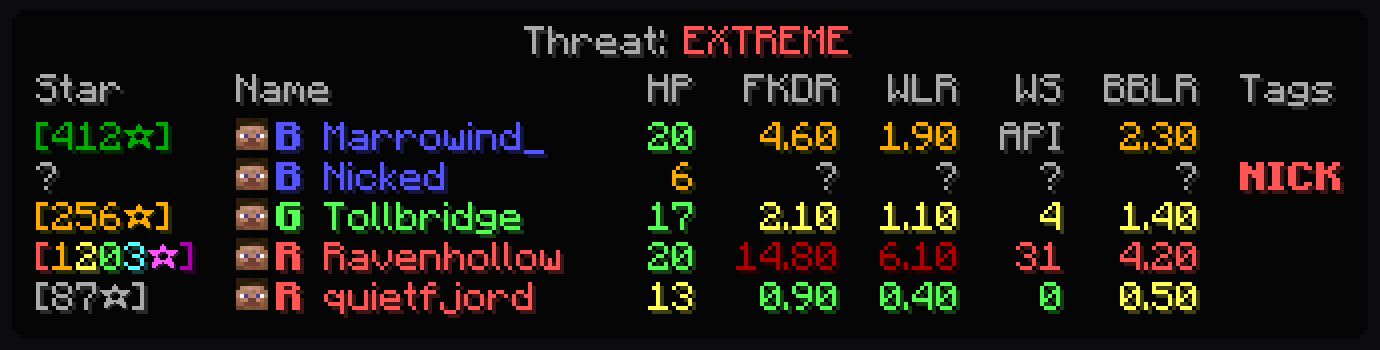
Start Lunar, launch 1.8.9 and join a Bed Wars game on Hypixel. Hold Tab to see every player's stats; Right Ctrl opens the Lookout settings.
Forge 1.8.9 (Minecraft launcher)
Install Forge 1.8.9
Get Forge 1.8.9 (11.15.1.2318) from files.minecraftforge.net and install the client. A new Forge profile appears in the Minecraft launcher.
Install Lookout
Run the installer. It sets up in your own user folder.
Install the mod
In the Lookout app, open Setup, choose your game folder under Forge 1.8.9 and click Install the mod. Use a folder with 1.8.9 mods only.
Play
Start the Forge 1.8.9 profile and join a Bed Wars game on Hypixel. Hold Tab to see every player's stats.
Add cheater tags (optional)
Join Urchin's Discord (discord.com/invite/urchin), type /dashboard to get your free key, and paste it in the app's Cheater tags card.
Nothing in your tab?
Check that Setup in the Lookout app says Enabled (Lunar) or Installed (Forge), then restart the game. In game, Right Ctrl should open the Lookout settings: if it does, Lookout is running. Still stuck? Ask on our Discord.
Removing Lookout
Lunar: click Remove from Lunar in the app. Forge: click Remove in the app, or delete the Lookout file from your mods folder. Then uninstall the app from Windows settings.